Despite expert forecasts, print photography refuses to die. Photographic film is undergoing a rebirth, and not only in a professional environment. Kodak resumes production of one of the most popular Ektachrome film rolls, and Fujifilm promises to return the popular Acros 100 black and white film for sale. Instant printing cameras began to appear on the market again a couple of years ago. So, for example, recently Polaroid Snap cameras with Zink technology were released, which allows you to get prints without using ink. And this is a very strong competitor to Fujifilm photographic equipment.
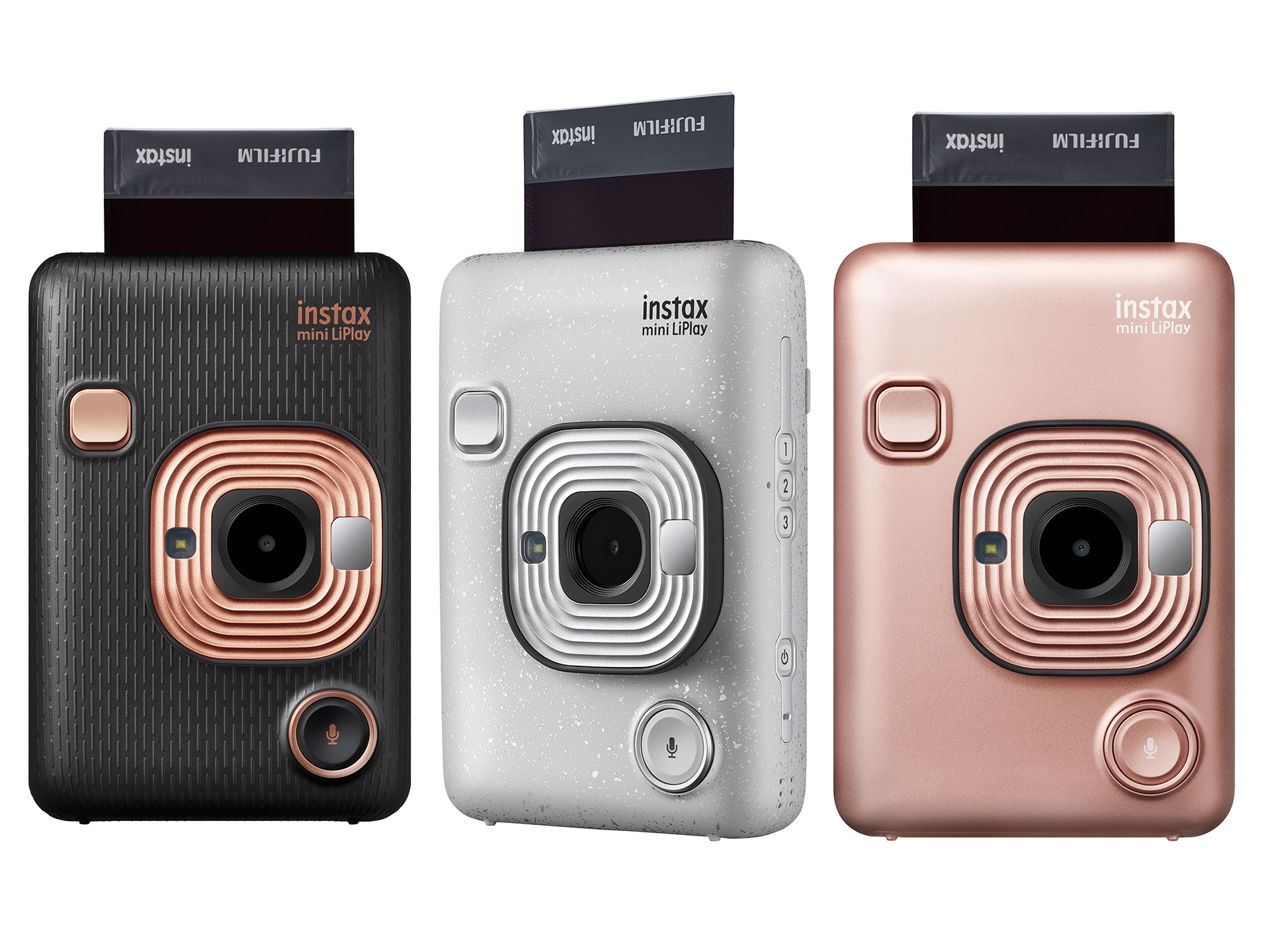
Fujifilm Instax Mini LiPlay camera – further development and revival of the idea of instant photography. It turned out to be more compact than other cameras of the Instax family, but the cassettes for film are used the same.
The camera is equipped with a glass lens and can print photos on its own. Using a separate application, you can print photos from your smartphone. You can also attach an audio message to photos, but we’ll talk about this below.
The main difference between LiPlay and other models of the Instax family is that you can see photos on the LCD screen before printing. This is convenient and allows you to economically use photo paper. In other cameras of this series – for example, in the Mini 90 – there is no such option.
The most beautiful function of the camera is the on-screen animation that occurs when printing photos: the image on the screen scrolls at almost the same speed as it is printed by the printer. A very nice and beautiful effect that allows you to see the transition from the virtual world to the real one.
Pictures on LiPlay are better and clearer than on the Mini 90. However, LiPlay lacks some of the features that other Instax models have. For example, there are no double exposure or macro modes. Fortunately, there is an exposure compensation mode. All Instax cameras tend to blur highlights and suffer from the so-called “black crush” effect. It appears when the angle relative to the perpendicular to the center of the surface of the camera changes. If you look strictly directly at the subject, then the black color is as saturated as possible, but it is worth starting to change the angle, and the dirty gray porridge will replace the deep shades of black. Therefore, depending on the conditions of photography, you need to use exposure compensation to brighten shadows or darken light areas.
The camera is easy to hold and comfortable to carry in your jacket pocket. The design is simple and convenient. There is a power button on the sidewall of the camera, and next to it there are three buttons that allow you to add visual effects to the photo – there are about ten in total.
Also on the back of the LCD screen there are buttons “Back”, “View” and “Print”. The “Set” button allows you to navigate the menu for managing various print and shooting settings.
On the front of the case is the shutter button, a selfie mirror, an autofocus lamp and a sound recording key.
The camera comes in three colors – black, white and rose gold.
And the recorder …
Instax Mini LiPlay can record audio messages lasting up to 10 seconds and attach them to the photo via a sticker with a QR code. The message itself will be stored on Fujifilm’s servers. By scanning the code, you can listen to the recording. Unfortunately, in practice this option is inconvenient to use – you will have to install a special application for working with QR codes on your phone.
And the printer …
The camera can also be used as a mini printer. Direct Print allows you to print photos directly from your smartphone. Before sending for printing, the image can be rotated in the desired direction. But if you need to edit the picture, you will have to look for some program for processing photos. This is not such a big drawback – there are a lot of such programs.
And the magic of photography …
If we consider only the technical characteristics, then in the LiPlay camera there is nothing special. Of course, they are much inferior to professional technology. Here the main role is played not by technical specifications, but photographs. This camera is for people who print a lot of photos and collect large photo albums for memory.
This is a doubly successful purchase if it is a gift for a child. There is something magical about when you see the image on photo paper gradually appear. And for children, this process seems even more unusual.
Summing up, I will list the pros and cons of this camera. Photos for printing are good enough. The camera is compact, fits in your pocket and costs less than a camera and printer separately. You can print photos from both the camera and smartphone. There are also disadvantages, and the most significant is the price. The camera itself costs $ 160, and still have to pay $ 15 for a cassette with a film for 20 shots. And unfortunately, the printer only prints photos in a small format – it cannot be used with Instax SQ6, SQ10, SP3 cameras.