
Roblox is a vibrant gaming platform where players can create, explore, and enjoy countless games. One of the best ways to enhance your experience is by using codes to unlock free items, rewards, and exclusive in-game perks. Whether you’re a new player or a seasoned Roblox enthusiast, learning how to redeem codes can save you time and boost your gameplay. For the latest tips and tricks, check out resources like GirlyDaily, which offers guides on gaming, tech, and more.
What Are Roblox Codes?
Roblox codes are special combinations of letters, numbers, or both that developers release to reward players with free items. These could include in-game currency, skins, accessories, or other exciting perks. Codes are often shared during game updates, special events, or promotional campaigns. However, they usually have an expiration date, so acting fast is key to claiming your rewards.
If you’re wondering how to use codes on Roblox, the process is straightforward and takes just a few minutes. This guide will walk you through each step to ensure you never miss out on free goodies.
Why Use Codes?
Redeeming codes offers several benefits. First, they provide free rewards without spending Robux, the platform’s currency. Second, codes can unlock exclusive items that enhance your avatar’s style or give you an edge in specific games. Finally, staying updated with codes keeps you connected to the Roblox community and its latest trends. Therefore, knowing how to find and use these codes is a must for any player.
Step-by-Step Guide to Redeeming Codes
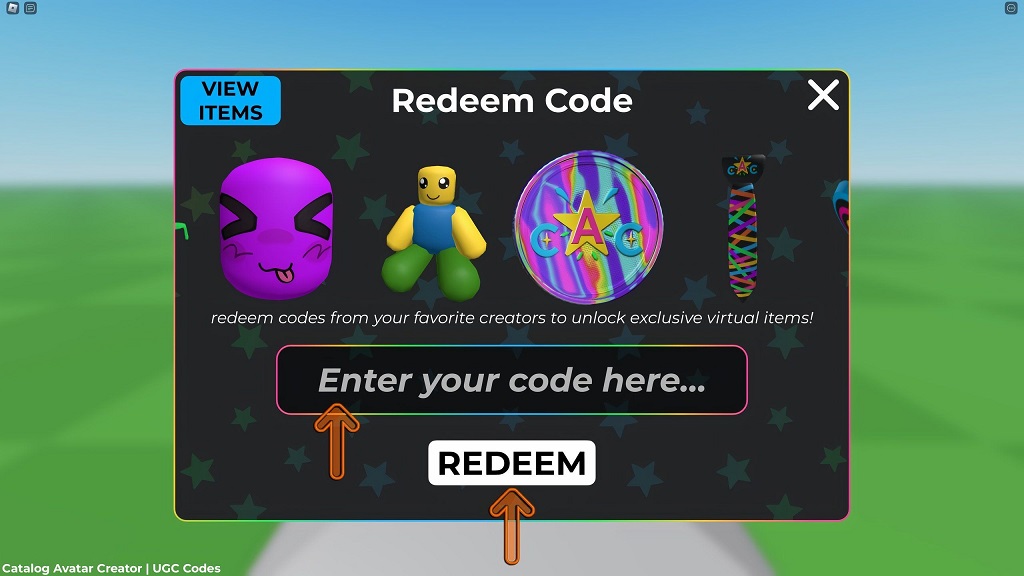
Follow these simple steps to redeem codes and claim your rewards quickly.
Step 1: Find Active Codes
Before you can redeem codes, you need to find valid ones. Developers often share codes on their game’s Roblox page, social media, or community platforms like Discord. Additionally, websites like GirlyDaily regularly compile lists of active codes for popular Roblox games. Always verify the codes are current, as expired ones won’t work.
Step 2: Log Into Your Roblox Account
Ensure you’re logged into the Roblox account where you want the rewards applied. You can access Roblox through the official website, mobile app, or desktop app. If you don’t have an account, sign up for free in just a few clicks.
Step 3: Navigate to the Code Redemption Page
For most Roblox games, codes are redeemed directly in the game. However, some codes are redeemed on the official Roblox website. To do this:
- Visit the Roblox website.
- Click on the “Promo Code Redemption” section, typically found under the “Robux” tab.
- Alternatively, open the specific game where the code applies.
Step 4: Enter the Code
Once you’re on the redemption page or in-game code section, type or paste the code exactly as it appears. Codes are case-sensitive, so double-check for accuracy. For example, a code like “FREEREWARDS” must be entered with the correct capitalization.
Step 5: Submit and Enjoy Your Rewards
After entering the code, click the “Redeem” button. If the code is valid, you’ll receive a confirmation message, and the rewards will be added to your account. Check your inventory or in-game currency to see your new items. If the code doesn’t work, it may have expired or been entered incorrectly.
Tips for Finding Valid Codes
Finding working codes can sometimes feel like a treasure hunt. Here are some practical tips to stay ahead:
- Follow game developers on platforms like X or Discord for real-time code drops.
- Check trusted websites for updated code lists.
- Join Roblox community groups where players share codes and tips.
- Subscribe to newsletters from gaming sites for exclusive codes.
- Avoid unofficial sources to prevent scams or fake codes.
By staying proactive, you’ll always have a steady supply of codes to redeem.
Common Mistakes to Avoid When Using Codes
Even though redeeming codes is simple, mistakes can happen. Here are some pitfalls to watch out for:
- Entering expired codes: Always check the code’s validity before trying to redeem it.
- Typing errors: Copy and paste codes to avoid typos.
- Redeeming in the wrong game: Some codes are game-specific, so ensure you’re in the correct game.
- Ignoring case sensitivity: Enter codes exactly as provided, including uppercase and lowercase letters.
By avoiding these errors, you’ll save time and frustration.
Popular Roblox Games with Active Codes
Many Roblox games offer codes, but some are more consistent with releases. Here are a few popular titles known for frequent code drops:
- Blox Fruits: Offers codes for XP boosts and in-game currency.
- Adopt Me: Provides codes for pets, accessories, and bucks.
- Pet Simulator X: Features codes for coins, gems, and rare pets.
- Tower of Hell: Shares codes for skins and other rewards.
- Arsenal: Gives codes for skins, weapons, and announcer voices.
Check each game’s official Roblox page or community channels for the latest codes.
How to Stay Safe While Using Roblox Codes
While redeeming codes is generally safe, you should be cautious to protect your account. Only use codes from trusted sources like official game pages or reputable websites. Avoid clicking on suspicious links promising “free Robux” or “exclusive codes,” as these could lead to scams. Additionally, never share your account details or personal information when redeeming codes.
Maximizing Your Roblox Experience with Codes
Using codes is just one way to enhance your Roblox experience. To get the most out of the platform:
- Explore new games regularly to discover unique rewards.
- Join Roblox events for limited-time codes and items.
- Customize your avatar with free accessories from codes.
- Share codes with friends to build a stronger gaming community.
By combining codes with active gameplay, you’ll unlock endless possibilities in Roblox.
Read More Also: Keep Onion Tears Away: Simple Tricks to Prevent Burning Eyes
Conclusion
Learning how to use codes on Roblox is a game-changer for players looking to score free items and rewards. By following the steps outlined—finding valid codes, logging into your account, and redeeming them correctly—you can unlock exciting perks in no time. Stay proactive by checking trusted sources, avoid common mistakes, and always prioritize account safety. With these tips, you’ll be well-equipped to make the most of and elevate your gaming experience.
Read More Also: Miami of Ohio Residence Halls: Your Guide to Campus Housing Options
Frequently Asked Questions
Where can I find the latest Roblox codes?
You can find codes on game developers’ social media, official Roblox game pages, or trusted websites like GirlyDaily, which regularly update code lists.
Do Roblox codes expire?
Yes, most codes have an expiration date. Always redeem them as soon as possible to avoid missing out on rewards.
Can I use the same code multiple times?
No, most can only be redeemed once per account. Check for new codes if you’ve already used one.
Why isn’t my Roblox code working?
The code may have expired, been entered incorrectly, or is not valid for the specific game. Double-check the code and try again.
Are Roblox codes free to use?
Yes, Roblox codes are completely free and provided by developers as rewards for players.